## 모델 트레이닝하기
다음 코드는 기본적인 머신러닝 워크플로를 시뮬레이션합니다. 모델을 트레이닝하고, 메트릭을 로깅하고, 모델을 아티팩트로 저장합니다.
트레이닝 중 W\&B와 상호작용하려면 W\&B Python SDK(`wandb.sdk`)를 사용하세요. [`wandb.Run.log()`](/ko/models/ref/python/experiments/run/#method-runlog)로 loss를 로깅한 다음, [`wandb.Artifact`](/ko/models/ref/python/experiments/artifact)로 트레이닝한 모델을 아티팩트로 저장하고, 마지막으로 [`Artifact.add_file`](/ko/models/ref/python/experiments/artifact#add_file)로 모델 파일을 추가합니다.
```python theme={null}
import random # 데이터 시뮬레이션용
def model(training_data: int) -> int:
"""Model simulation for demonstration purposes."""
return training_data * 2 + random.randint(-1, 1)
# 가중치 및 노이즈 시뮬레이션
weights = random.random() # 랜덤 가중치 초기화
noise = random.random() / 5 # 노이즈 시뮬레이션을 위한 소규모 랜덤 노이즈
# 하이퍼파라미터 및 설정
config = {
"epochs": 10, # 트레이닝할 에포크 수
"learning_rate": 0.01, # 옵티마이저의 학습률
}
# 컨텍스트 매니저를 사용하여 W&B runs 초기화 및 종료
with wandb.init(project=PROJECT, entity=TEAM_ENTITY, config=config) as run:
# 트레이닝 루프 시뮬레이션
for epoch in range(config["epochs"]):
xb = weights + noise # 시뮬레이션된 입력 트레이닝 데이터
yb = weights + noise * 2 # 시뮬레이션된 목표 출력 (입력 노이즈의 두 배)
y_pred = model(xb) # 모델 예측
loss = (yb - y_pred) ** 2 # 평균 제곱 오차 loss
print(f"epoch={epoch}, loss={loss}")
# 에포크 및 loss를 W&B에 로깅
run.log({
"epoch": epoch,
"loss": loss,
})
# 모델 아티팩트의 고유 이름
model_artifact_name = f"model-demo"
# 시뮬레이션된 모델 파일을 저장할 로컬 경로
PATH = "model.txt"
# 모델을 로컬에 저장
with open(PATH, "w") as f:
f.write(str(weights)) # 모델 가중치를 파일에 저장
# 아티팩트 객체 생성
# 로컬에 저장된 모델을 아티팩트 객체에 추가
artifact = wandb.Artifact(name=model_artifact_name, type="model", description="My trained model")
artifact.add_file(local_path=PATH)
artifact.save()
```
이전 코드 블록의 핵심 내용은 다음과 같습니다.
* 트레이닝 중에 메트릭을 로깅하려면 `wandb.Run.log()`를 사용합니다.
* 모델(데이터셋 등)을 W\&B 프로젝트에 아티팩트로 저장하려면 `wandb.Artifact`를 사용합니다.
이제 모델을 트레이닝하고 아티팩트로 저장했으므로, W\&B의 레지스트리에 게시할 수 있습니다. 프로젝트에서 아티팩트를 조회하고 Model 레지스트리에 게시할 준비를 하려면 [`wandb.Run.use_artifact()`](/ko/models/ref/python/experiments/run/#method-runuse_artifact)를 사용합니다. `wandb.Run.use_artifact()`는 두 가지 핵심 용도로 사용됩니다.
* 프로젝트에서 아티팩트 객체를 조회합니다.
* 아티팩트를 run의 입력으로 표시해 재현성과 추적 가능성을 보장합니다. 자세한 내용은 [Create and view Lineage 맵](/ko/models/registry/lineage)을 참조하세요.
## 대시보드에서 트레이닝 데이터 확인하기
[https://wandb.ai/login](https://wandb.ai/login) 에서 계정에 로그인합니다.
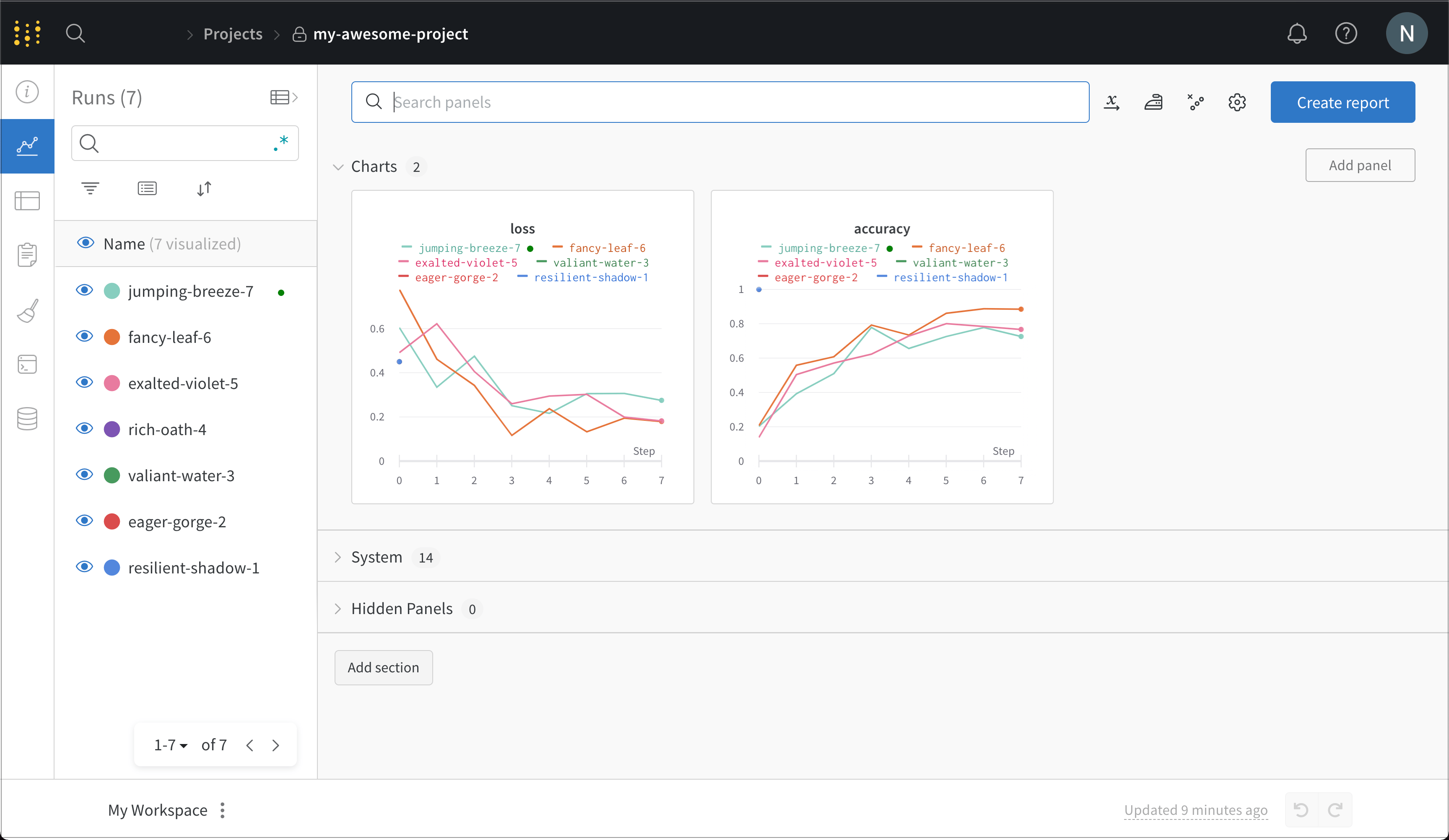
**Projects** 아래에 `my-awesome-project`(또는 위에서 프로젝트 이름으로 사용한 이름)가 표시됩니다. 이를 클릭해 프로젝트의 워크스페이스로 이동합니다.
여기에서 지금까지 수행한 모든 run의 세부 정보를 확인할 수 있습니다. 이 스크린샷에서는 코드를 여러 번 다시 실행해 여러 run이 생성되었으며, 각 run에는 무작위로 생성된 이름이 지정되어 있습니다.
## 모델을 W\&B 레지스트리에 게시하기
조직의 다른 사용자와 모델을 공유하려면 `wandb.Run.link_artifact()`를 사용해 [컬렉션](/ko/models/registry/create_collection)에 게시하세요. 다음 코드는 아티팩트를 [레지스트리](/ko/models/registry)에 연결하여 팀에서 액세스할 수 있게 합니다.
```python theme={null}
# 아티팩트 이름은 팀 프로젝트 내의 특정 아티팩트 버전을 지정합니다
artifact_name = f'{TEAM_ENTITY}/{PROJECT}/{model_artifact_name}:v0'
print("Artifact name: ", artifact_name)
REGISTRY_NAME = "Model" # W&B의 레지스트리 이름
COLLECTION_NAME = "DemoModels" # 레지스트리의 컬렉션 이름
# 레지스트리에서 아티팩트의 대상 경로 생성
target_path = f"wandb-registry-{REGISTRY_NAME}/{COLLECTION_NAME}"
print("Target path: ", target_path)
with wandb.init(entity=TEAM_ENTITY, project=PROJECT) as run:
model_artifact = run.use_artifact(artifact_or_name=artifact_name, type="model")
run.link_artifact(artifact=model_artifact, target_path=target_path)
```
`wandb.Run.link_artifact()`를 실행하면 모델 아티팩트가 레지스트리의 `DemoModels` 컬렉션에 추가됩니다. 여기에서 버전 이력, [Lineage 맵](/ko/models/registry/lineage), 기타 [메타데이터](/ko/models/registry/registry_cards) 등의 세부 정보를 확인할 수 있습니다.
아티팩트를 레지스트리에 연결하는 방법에 대한 자세한 내용은 [아티팩트를 레지스트리에 연결하기](/ko/models/registry/link_version)를 참조하세요.
## Inference용 모델 아티팩트를 레지스트리에서 조회
모델로 Inference를 수행하려면 `wandb.Run.use_artifact()`를 사용하여 레지스트리에서 게시된 아티팩트를 조회합니다. 그러면 아티팩트 객체가 반환되며, 이후 [`wandb.Artifact.download()`](/ko/models/ref/python/experiments/artifact/#method-artifactdownload)을 사용해 아티팩트를 로컬 파일로 다운로드할 수 있습니다.
```python theme={null}
REGISTRY_NAME = "Model" # W&B의 레지스트리 이름
COLLECTION_NAME = "DemoModels" # 레지스트리의 컬렉션 이름
VERSION = 0 # 조회할 아티팩트의 버전
model_artifact_name = f"wandb-registry-{REGISTRY_NAME}/{COLLECTION_NAME}:v{VERSION}"
print(f"Model artifact name: {model_artifact_name}")
with wandb.init(entity=TEAM_ENTITY, project=PROJECT) as run:
registry_model = run.use_artifact(artifact_or_name=model_artifact_name)
local_model_path = registry_model.download()
```
레지스트리에서 아티팩트를 조회하는 방법에 대한 자세한 내용은 [레지스트리에서 아티팩트 다운로드](/ko/models/registry/download_use_artifact)를 참조하세요.
사용 중인 머신 러닝 프레임워크에 따라 가중치를 로드하기 전에 모델 아키텍처를 다시 생성해야 할 수 있습니다. 이는 사용하는 프레임워크와 모델에 따라 달라지므로, 여기서는 독자가 직접 수행하는 것으로 남겨 둡니다.
## 레지스트리 쿼리하기
[W\&B Public API](/ko/models/ref/python/public-api)를 사용해 W\&B의 이력 데이터를 쿼리하고, 분석하고, 관리할 수 있습니다. 이는 아티팩트의 리니지를 추적하고, 서로 다른 버전을 비교하며, 시간에 따른 모델 성능을 분석하는 데 유용합니다.
다음 코드 블록은 특정 컬렉션의 모든 아티팩트를 대상으로 모델 레지스트리를 쿼리하는 방법을 보여줍니다. 컬렉션을 조회한 뒤 해당 버전들을 순회하면서 각 아티팩트의 이름과 버전을 출력합니다.
```python theme={null}
import wandb
# wandb API 초기화
api = wandb.Api()
# 문자열 `model`을 포함하고
# `text-classification` 태그 또는 `latest` 별칭을 가진 모든 아티팩트 버전 찾기
registry_filters = {
"name": {"$regex": "model"}
}
# 논리 $or 연산자를 사용하여 아티팩트 버전 필터링
version_filters = {
"$or": [
{"tag": "text-classification"},
{"alias": "latest"}
]
}
# 필터와 일치하는 모든 아티팩트 버전의 이터러블 반환
artifacts = api.registries(filter=registry_filters).collections().versions(filter=version_filters)
# 찾은 각 아티팩트의 이름, 컬렉션, 별칭, 태그, created_at 날짜 출력
for art in artifacts:
print(f"artifact name: {art.name}")
print(f"collection artifact belongs to: { art.collection.name}")
print(f"artifact aliases: {art.aliases}")
print(f"tags attached to artifact: {art.tags}")
print(f"artifact created at: {art.created_at}\n")
```
레지스트리 쿼리에 대한 자세한 내용은 [레지스트리 항목 쿼리](/ko/models/registry/search_registry/#query-registry-items-with-mongodb-style-queries)를 참조하세요.