> ## Documentation Index
> Fetch the complete documentation index at: https://wb-21fd5541-run-filter-ui-updates.mintlify.site/llms.txt
> Use this file to discover all available pages before exploring further.
# Hugging Face Diffusers
> Hugging Face Diffusers와 함께 W&B autolog를 사용해 프롬프트, 생성된 미디어, 설정, 파이프라인 아키텍처를 추적하세요.
export const ColabLink = ({url}) =>
Colab에서 사용해 보기
;
[Hugging Face Diffusers](https://huggingface.co/docs/diffusers/index)는 이미지, 오디오, 심지어 분자의 3D 구조까지 생성할 수 있는 최첨단 사전 학습 확산 모델을 위한 사실상 표준 라이브러리입니다. W\&B 인테그레이션은 이런 사용 편의성은 그대로 유지하면서, 풍부하고 유연한 실험 추적, 미디어 시각화, 파이프라인 아키텍처, 설정 관리를 대화형 중앙 대시보드에 추가합니다.
## 단 두 줄로 시작하는 고급 로깅
코드 2줄만 추가하면 실험과 관련된 모든 프롬프트, 네거티브 프롬프트, 생성된 미디어, 설정을 기록할 수 있습니다. 로깅을 시작하려면 아래 2줄의 코드를 추가하세요:
```python theme={null}
# autolog 함수 임포트
from wandb.integration.diffusers import autolog
# 파이프라인을 호출하기 전에 autolog를 호출하세요
autolog(init=dict(project="diffusers_logging"))
```
## 시작하기
1. `diffusers`, `transformers`, `accelerate`, `wandb`를 설치합니다.
* 명령줄:
```shell theme={null}
pip install --upgrade diffusers transformers accelerate wandb
```
* 노트북:
```bash theme={null}
!pip install --upgrade diffusers transformers accelerate wandb
```
2. `autolog`를 사용해 W\&B Run을 초기화하고, [지원되는 모든 파이프라인 호출](https://github.com/wandb/wandb/blob/main/wandb/integration/diffusers/autologger.py#L12-L72)의 입력과 출력을 자동으로 추적합니다.
`autolog()` 함수는 `init` 매개변수와 함께 호출할 수 있으며, 이 매개변수는 [`wandb.init()`](/ko/models/ref/python/functions/init)에 필요한 매개변수 사전을 받습니다.
`autolog()`를 호출하면 W\&B Run이 초기화되고, [지원되는 모든 파이프라인 호출](https://github.com/wandb/wandb/blob/main/wandb/integration/diffusers/autologger.py#L12-L72)의 입력과 출력이 자동으로 추적됩니다.
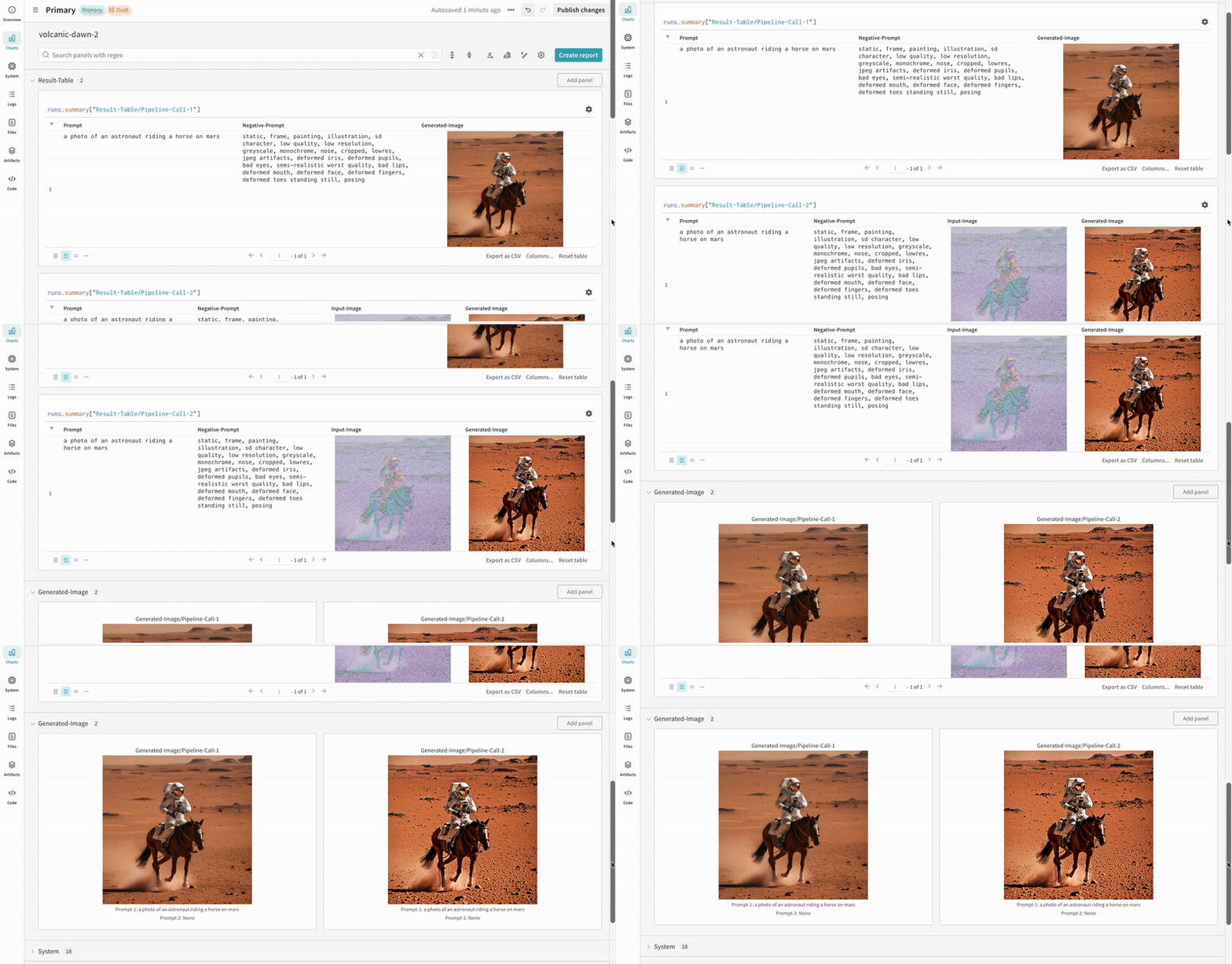
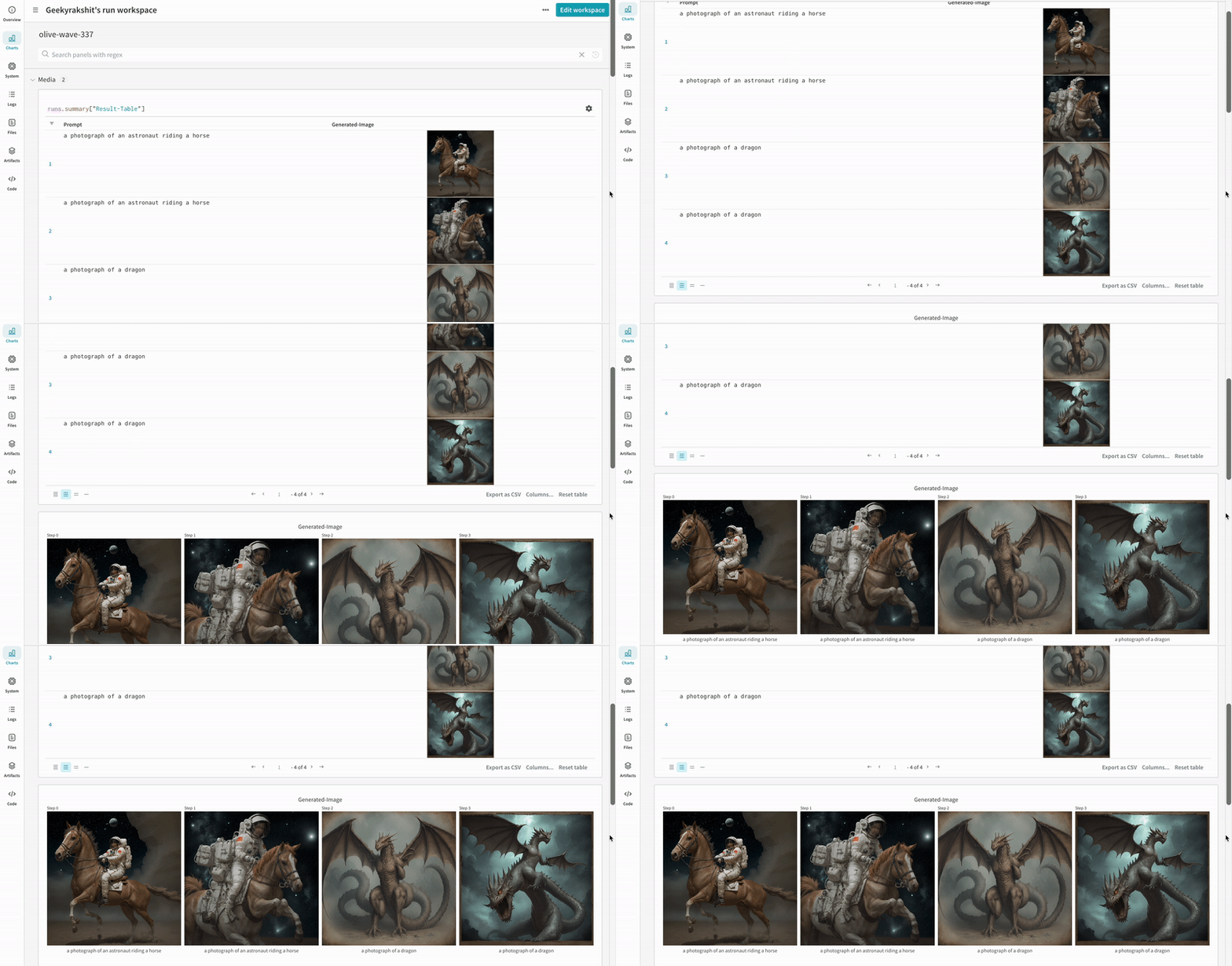
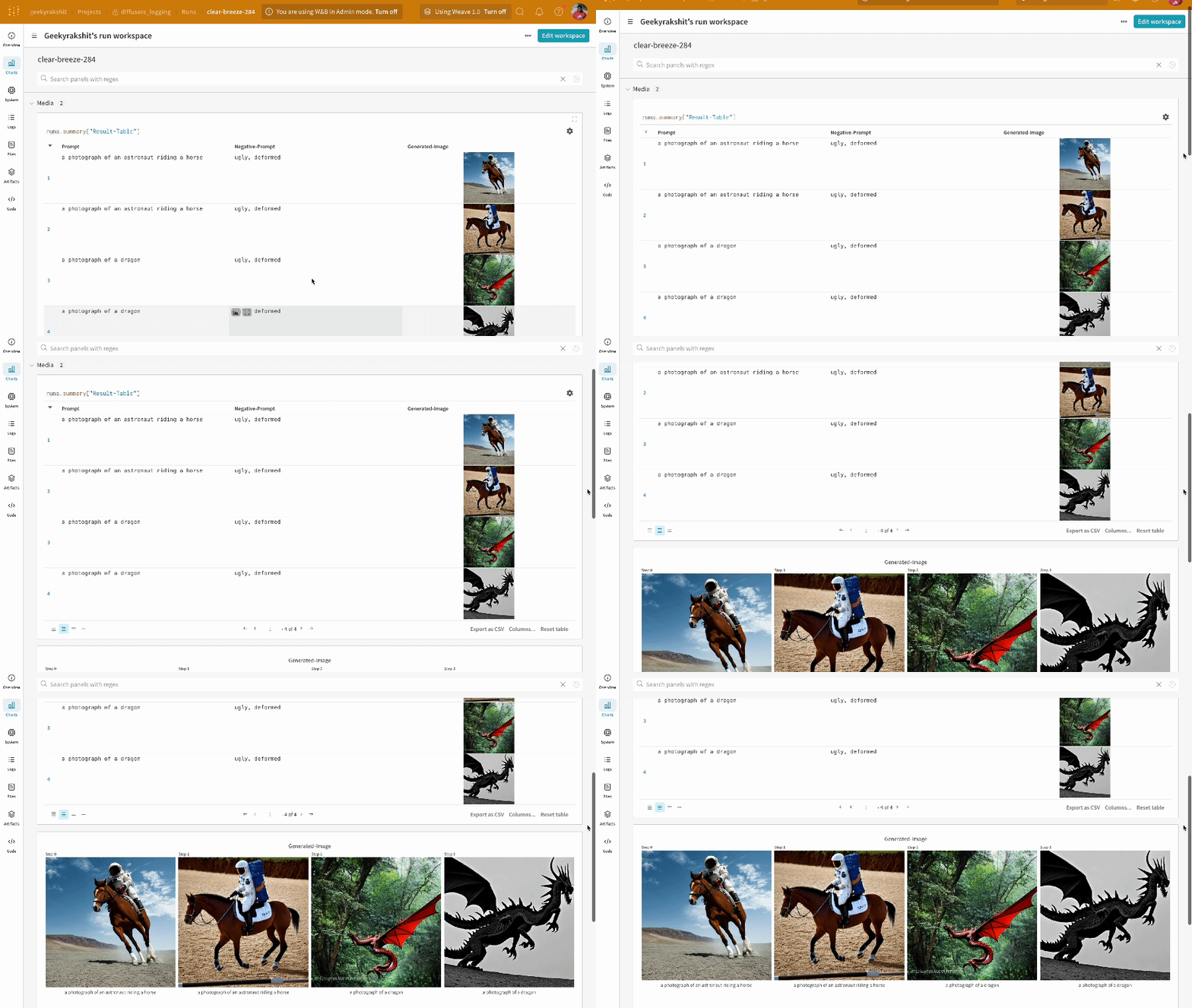
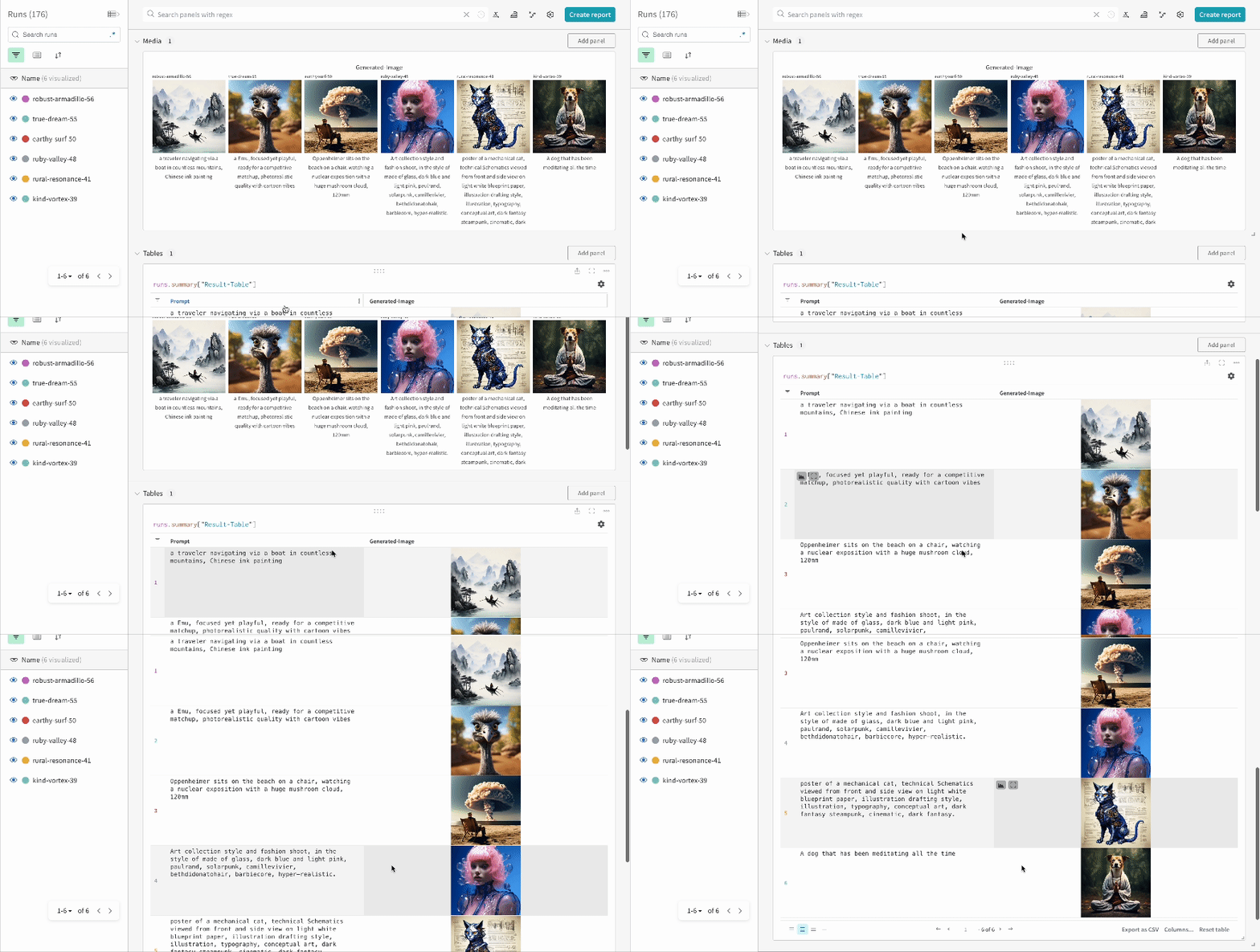
* 각 파이프라인 호출은 Workspace의 개별 [테이블](/ko/models/tables/)에 추적되며, 해당 파이프라인 호출과 관련된 설정은 해당 run의 설정에 있는 워크플로 목록에 추가됩니다.
* 프롬프트, 네거티브 프롬프트, 생성된 미디어는 [`wandb.Table`](/ko/models/tables/)에 로깅됩니다.
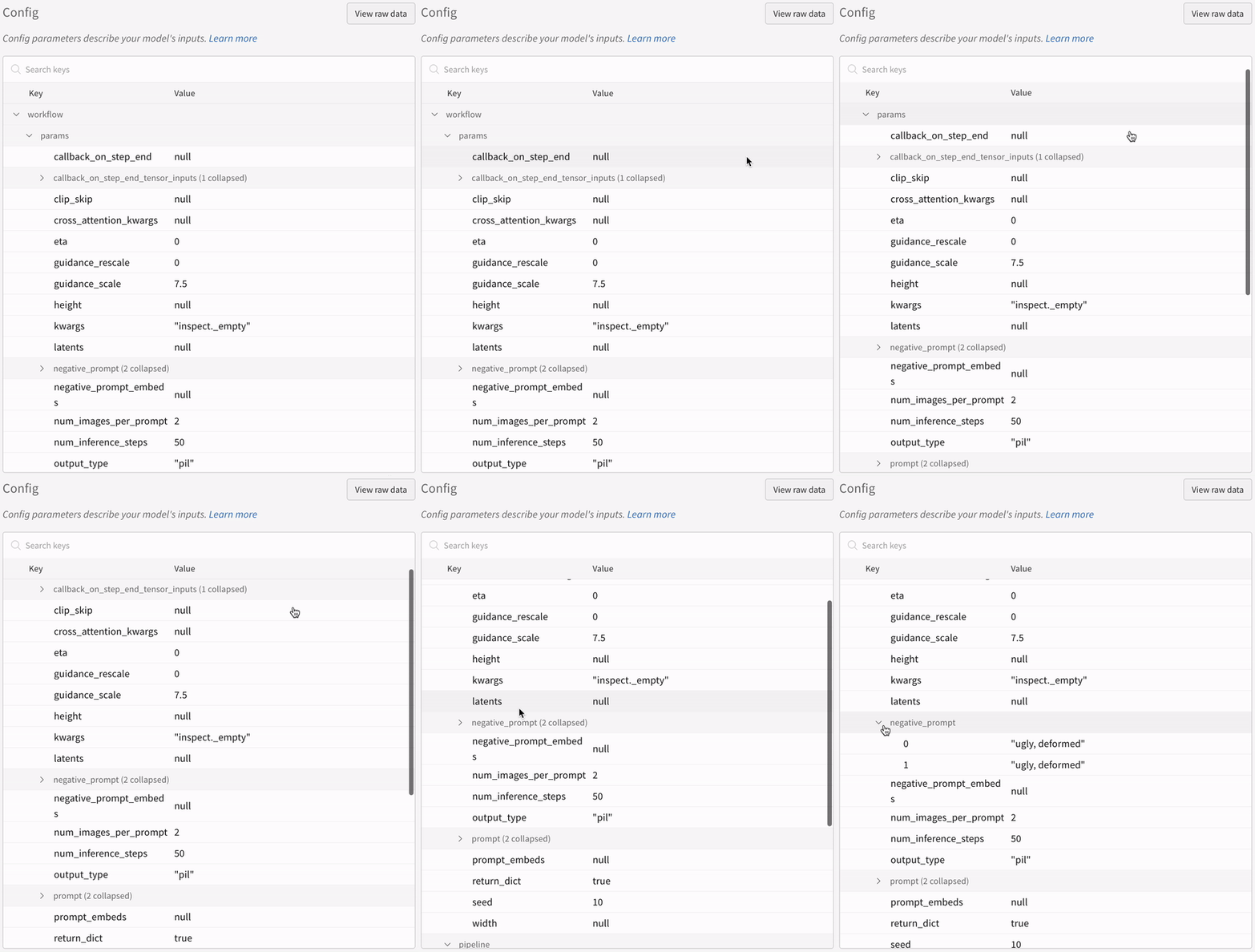
* 시드와 파이프라인 아키텍처를 포함해 실험과 관련된 다른 모든 설정은 run의 설정 섹션에 저장됩니다.
* 각 파이프라인 호출에서 생성된 미디어도 run의 [미디어 패널](/ko/models/track/log/media/)에 로깅됩니다.
[지원되는 파이프라인 호출 목록](https://github.com/wandb/wandb/blob/main/wandb/integration/diffusers/autologger.py#L12-L72)을 확인할 수 있습니다. 이 인테그레이션의 새 기능을 요청하거나 관련 버그를 보고하려면 [W\&B GitHub 이슈 페이지](https://github.com/wandb/wandb/issues)에서 이슈를 열어 주세요.
## 예제
### 자동 로깅
다음은 자동 로깅이 실제로 동작하는 모습을 보여주는 간단한 엔드 투 엔드 예시입니다:
```python theme={null}
import torch
from diffusers import DiffusionPipeline
# autolog 함수를 임포트합니다
from wandb.integration.diffusers import autolog
# 파이프라인을 호출하기 전에 autolog를 호출합니다
autolog(init=dict(project="diffusers_logging"))
# 디퓨전 파이프라인을 초기화합니다
pipeline = DiffusionPipeline.from_pretrained(
"stabilityai/stable-diffusion-2-1", torch_dtype=torch.float16
).to("cuda")
# 프롬프트, 네거티브 프롬프트, 시드를 정의합니다.
prompt = ["a photograph of an astronaut riding a horse", "a photograph of a dragon"]
negative_prompt = ["ugly, deformed", "ugly, deformed"]
generator = torch.Generator(device="cpu").manual_seed(10)
# 이미지를 생성하기 위해 파이프라인을 호출합니다
images = pipeline(
prompt,
negative_prompt=negative_prompt,
num_images_per_prompt=2,
generator=generator,
)
```
```python theme={null}
import torch
from diffusers import DiffusionPipeline
import wandb
# autolog 함수를 임포트합니다
from wandb.integration.diffusers import autolog
run = wandb.init()
# 파이프라인을 호출하기 전에 autolog를 호출합니다
autolog(init=dict(project="diffusers_logging"))
# 디퓨전 파이프라인을 초기화합니다
pipeline = DiffusionPipeline.from_pretrained(
"stabilityai/stable-diffusion-2-1", torch_dtype=torch.float16
).to("cuda")
# 프롬프트, 네거티브 프롬프트, 시드를 정의합니다.
prompt = ["a photograph of an astronaut riding a horse", "a photograph of a dragon"]
negative_prompt = ["ugly, deformed", "ugly, deformed"]
generator = torch.Generator(device="cpu").manual_seed(10)
# 이미지를 생성하기 위해 파이프라인을 호출합니다
images = pipeline(
prompt,
negative_prompt=negative_prompt,
num_images_per_prompt=2,
generator=generator,
)
# 실험을 종료합니다
run.finish()
```
* 단일 실험 결과:
* 여러 실험 결과:
* 실험 설정:
파이프라인을 호출한 후 IPython 노트북 환경에서 코드를 실행하는 경우 [`wandb.Run.finish()`](/ko/models/ref/python/functions/finish)를 명시적으로 호출해야 합니다. Python 스크립트를 실행할 때는 필요하지 않습니다.
### 다중 파이프라인 워크플로 추적
이 섹션에서는 일반적인 [Stable Diffusion XL + Refiner](https://huggingface.co/docs/diffusers/using-diffusers/sdxl#base-to-refiner-model) 워크플로를 사용해 autolog를 보여줍니다. 이 워크플로에서는 [`StableDiffusionXLPipeline`](https://huggingface.co/docs/diffusers/api/pipelines/stable_diffusion/stable_diffusion_xl)에서 생성된 latent를 해당 refiner가 후처리합니다.
```python theme={null}
import torch
from diffusers import StableDiffusionXLImg2ImgPipeline, StableDiffusionXLPipeline
from wandb.integration.diffusers import autolog
# SDXL 기본 파이프라인 초기화
base_pipeline = StableDiffusionXLPipeline.from_pretrained(
"stabilityai/stable-diffusion-xl-base-1.0",
torch_dtype=torch.float16,
variant="fp16",
use_safetensors=True,
)
base_pipeline.enable_model_cpu_offload()
# SDXL 리파이너 파이프라인 초기화
refiner_pipeline = StableDiffusionXLImg2ImgPipeline.from_pretrained(
"stabilityai/stable-diffusion-xl-refiner-1.0",
text_encoder_2=base_pipeline.text_encoder_2,
vae=base_pipeline.vae,
torch_dtype=torch.float16,
use_safetensors=True,
variant="fp16",
)
refiner_pipeline.enable_model_cpu_offload()
prompt = "a photo of an astronaut riding a horse on mars"
negative_prompt = "static, frame, painting, illustration, sd character, low quality, low resolution, greyscale, monochrome, nose, cropped, lowres, jpeg artifacts, deformed iris, deformed pupils, bad eyes, semi-realistic worst quality, bad lips, deformed mouth, deformed face, deformed fingers, deformed toes standing still, posing"
# 무작위성을 제어하여 실험을 재현 가능하게 만듭니다.
# 시드는 WandB에 자동으로 로깅됩니다.
seed = 42
generator_base = torch.Generator(device="cuda").manual_seed(seed)
generator_refiner = torch.Generator(device="cuda").manual_seed(seed)
# Diffusers용 WandB Autolog를 호출합니다. 프롬프트, 생성된 이미지,
# 파이프라인 아키텍처 및 관련 실험 설정이 모두 W&B에 자동으로 로깅되므로
# 이미지 생성 실험을 손쉽게 재현, 공유, 분석할 수 있습니다.
autolog(init=dict(project="sdxl"))
# 기본 파이프라인을 호출하여 잠재 벡터 생성
image = base_pipeline(
prompt=prompt,
negative_prompt=negative_prompt,
output_type="latent",
generator=generator_base,
).images[0]
# 리파이너 파이프라인을 호출하여 정제된 이미지 생성
image = refiner_pipeline(
prompt=prompt,
negative_prompt=negative_prompt,
image=image[None, :],
generator=generator_refiner,
).images[0]
```
```python theme={null}
import torch
from diffusers import StableDiffusionXLImg2ImgPipeline, StableDiffusionXLPipeline
import wandb
from wandb.integration.diffusers import autolog
run = wandb.init()
# SDXL 기본 파이프라인 초기화
base_pipeline = StableDiffusionXLPipeline.from_pretrained(
"stabilityai/stable-diffusion-xl-base-1.0",
torch_dtype=torch.float16,
variant="fp16",
use_safetensors=True,
)
base_pipeline.enable_model_cpu_offload()
# SDXL 리파이너 파이프라인 초기화
refiner_pipeline = StableDiffusionXLImg2ImgPipeline.from_pretrained(
"stabilityai/stable-diffusion-xl-refiner-1.0",
text_encoder_2=base_pipeline.text_encoder_2,
vae=base_pipeline.vae,
torch_dtype=torch.float16,
use_safetensors=True,
variant="fp16",
)
refiner_pipeline.enable_model_cpu_offload()
prompt = "a photo of an astronaut riding a horse on mars"
negative_prompt = "static, frame, painting, illustration, sd character, low quality, low resolution, greyscale, monochrome, nose, cropped, lowres, jpeg artifacts, deformed iris, deformed pupils, bad eyes, semi-realistic worst quality, bad lips, deformed mouth, deformed face, deformed fingers, deformed toes standing still, posing"
# 무작위성을 제어하여 실험을 재현 가능하게 만듭니다.
# 시드는 WandB에 자동으로 로깅됩니다.
seed = 42
generator_base = torch.Generator(device="cuda").manual_seed(seed)
generator_refiner = torch.Generator(device="cuda").manual_seed(seed)
# Diffusers용 WandB Autolog를 호출합니다. 프롬프트, 생성된 이미지,
# 파이프라인 아키텍처 및 관련 실험 설정이 W&B에 자동으로 로깅되어
# 이미지 생성 실험을 쉽게 재현, 공유, 분석할 수 있습니다.
autolog(init=dict(project="sdxl"))
# 기본 파이프라인을 호출하여 잠재 벡터 생성
image = base_pipeline(
prompt=prompt,
negative_prompt=negative_prompt,
output_type="latent",
generator=generator_base,
).images[0]
# 리파이너 파이프라인을 호출하여 정제된 이미지 생성
image = refiner_pipeline(
prompt=prompt,
negative_prompt=negative_prompt,
image=image[None, :],
generator=generator_refiner,
).images[0]
# 실험 종료
run.finish()
```
* Stable Diffusion XL + Refiner 실험 예시:
 * 여러 실험 결과:
 * 실험 설정: